Learn more
Update your Ricoh multifunction printers (MFPs) by downloading the latest features to help you optimise your document management workflows.
Always Current Models
*The timing of version updates may differ for each models. Please contact us for details on the version update status.
Installation guide
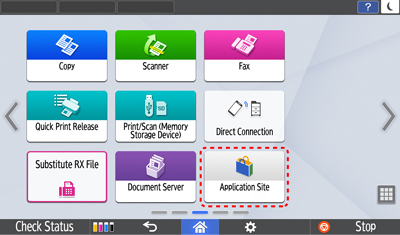
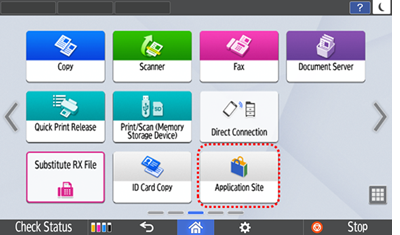
- Select Application Site on the panel
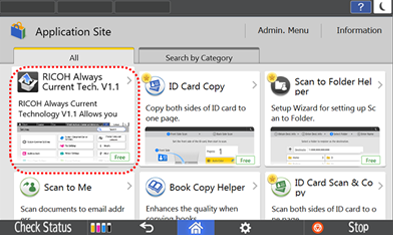
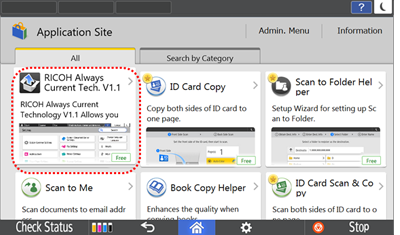
- Initiate download prompt by selecting RICOH Always Current Tech.
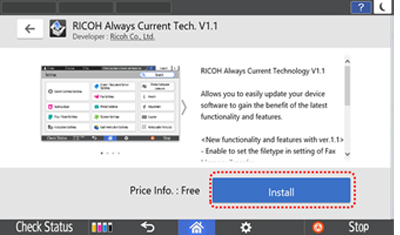
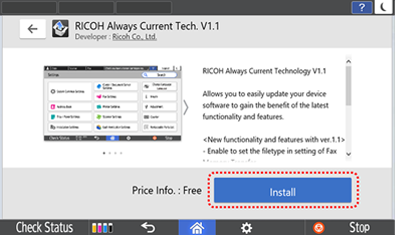
- Press Install button
- Select Execute button to start installation.
Device will restart after installation is done and you can now use the new features of RICOH Always Current Technology.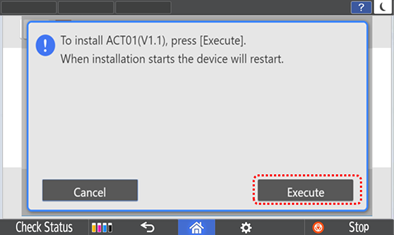
- Select Application Site on the panel
- Initiate download prompt by selectingRICOH Always Current Tech.
- Press Install button
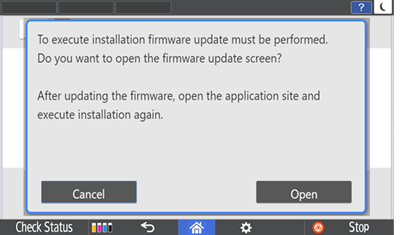
- To update firmware, select Open and device will restart after firmware is updated.
Latest updates
What’s new:
- New security enhancement
- New usability improvement
Find out more:
What’s new:
- New security enhancement
- New usability improvement
- New FAX feature added
- New setting improvement
Find out more:
What’s new:
- New usability improvement
- New security enhancement
Find out more:
What’s new:
- New usability improvement
- New features added to Smart Copy
- New features added to Smart Fax
- New features added to Smart Scan
Find out more:
What’s new:
- New usability improvement
- New features added to Smart Fax
- New device management improvement
- New security enhancement
Find out more:
What’s new:
- New interface improvements on Smart Operation Panel
- New features added to Smart Copy
- New features added to Smart Fax
- New enhanced IT features
- New usability improvements
Find out more:
What’s new:
- New interface for Settings screen
- New features added to Smart Copy
- New file type selection and location function added to Fax settings.
Find out more:
When you activate the latest version of ACT, all previous updated features will be included.
New features may vary with the products, please refer to the product's manual for the availability of each feature.
RICOH Always Current Technology features availability are subjected to different regions and countries.
Please contact your local representatives for more information.